Contact us
 Customer Area
 Visit LWS
Rate this article :
1.9/5 | 9 opinion
This article was useful to you ?
 Yes
Yes
 No
No
 Article read
202059 once
Article read
202059 once Merci ! N'hésitez pas à
poser des questions sur nos documentations si vous souhaitez plus d'informations et nous aider à les
améliorer.
Merci ! N'hésitez pas à
poser des questions sur nos documentations si vous souhaitez plus d'informations et nous aider à les
améliorer.Vous avez noté 0 étoile(s)



Sommaire
Procédure
This article explains how to contactLWS sales support at depending on your situation.
You will find the different solutions available if you are already a customer, if you are not yet a customer, or if you wish to contact a sales advisor by telephone.
This documentation is aimed at LWS customers as well as people who wish to obtain commercial or administrative information before or after placing an order.
Sales or administrative support can be contacted in the following situations:
If your request concerns a technical problem with an active service, please contact Technical Support.
This procedure concerns :
Before you start, prepare the following items according to your situation.
The contact form can also be used by customers who are unable to access their LWS customer area.
In this case, please have ready :
Telephone sales support is available to both customers and non-customers.
Preparing this information in advance will facilitate the exchange and processing of your request.
This solution is preferable if you are already an LWS customer.
You can send a sales or administrative request directly from your account.
Step 1: log in to your LWS customer area
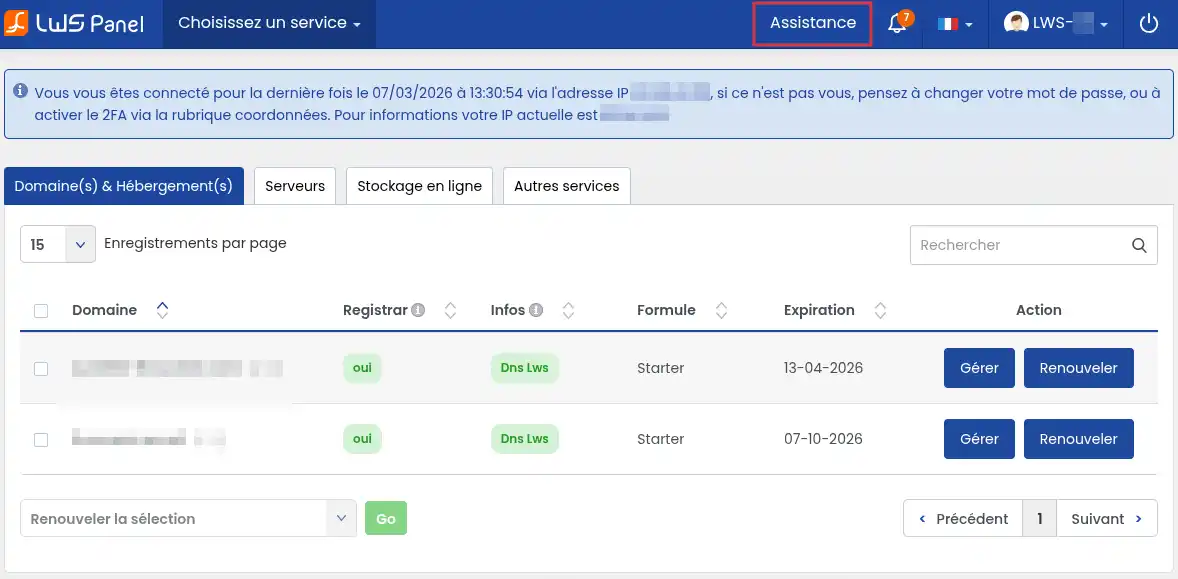
Step 2: Open the "Support" section at the top right of your screen.
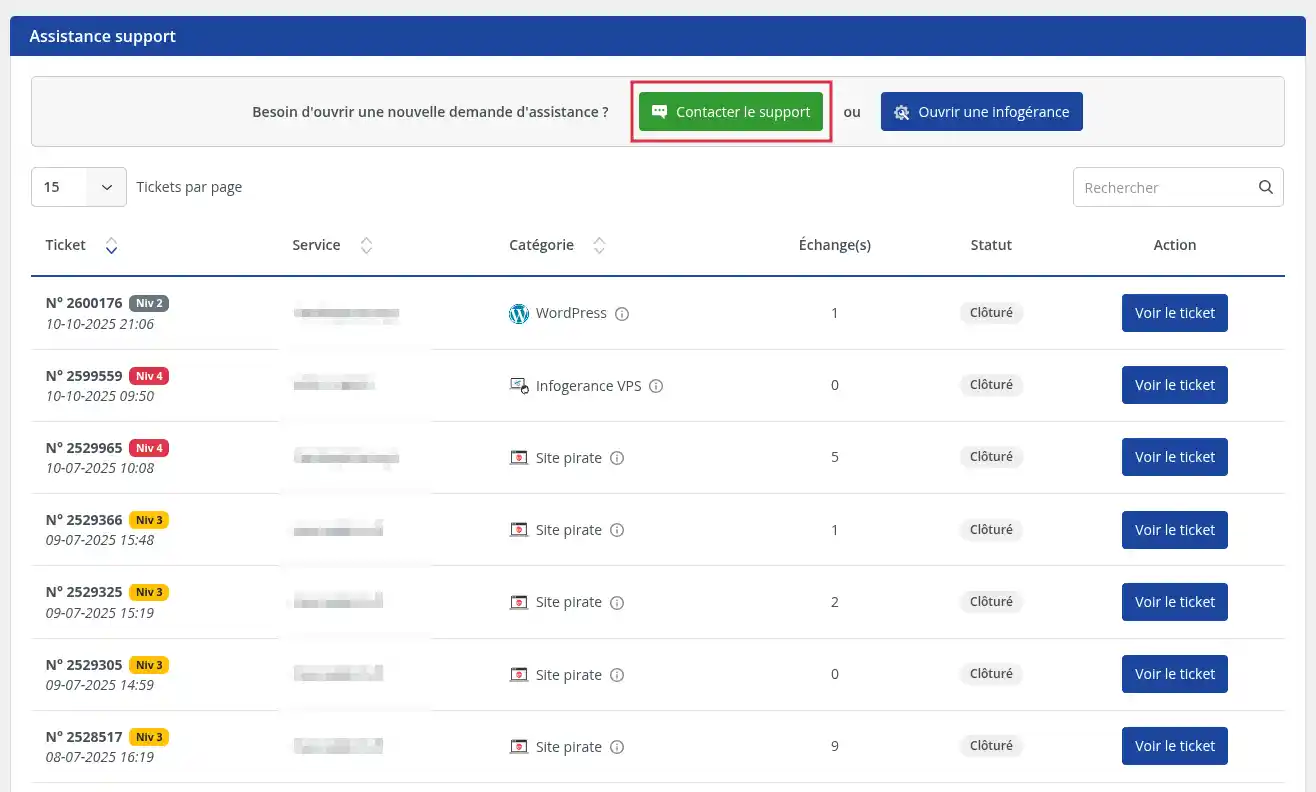
Step 3: On the support page, click on the "Contact Support" button .
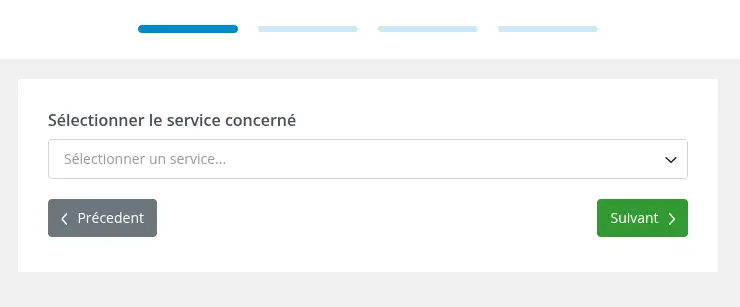
Step 4 : Select the service related to your request, then click "Next".
Examples include:
Choose the service closest to your request to make it easier to process.
If your request is not linked to a particular service (e.g. change of account details), select any service.
Step 5: Enter your message, clearly explaining your need, then click "Next".
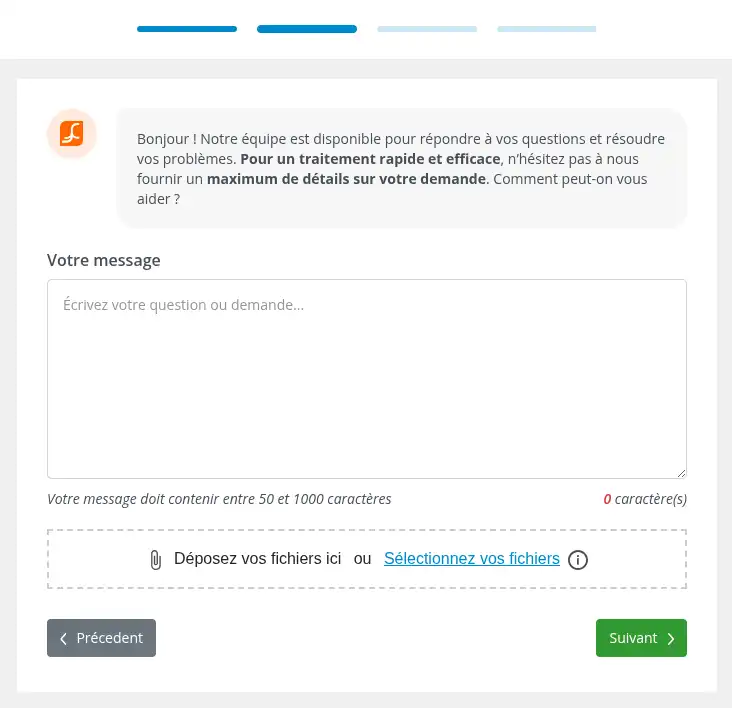
For a quicker and more precise response, remember to indicate :
Step 6: Select the "Sales/Administration" category , then click on "Open ticket".
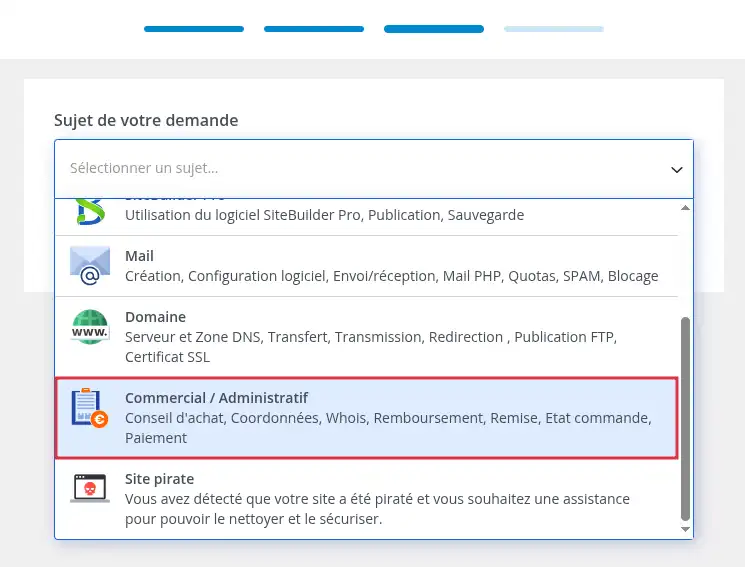
Your request will then be forwarded to the relevant department.
If you are not yet a customer, or if you are already a customer but are unable to log in to your LWS customer area, you can contact sales or administrative support from the LWS site using the contact form.
This solution is particularly useful
Step 1 : Open the Contact page on the LWS site.
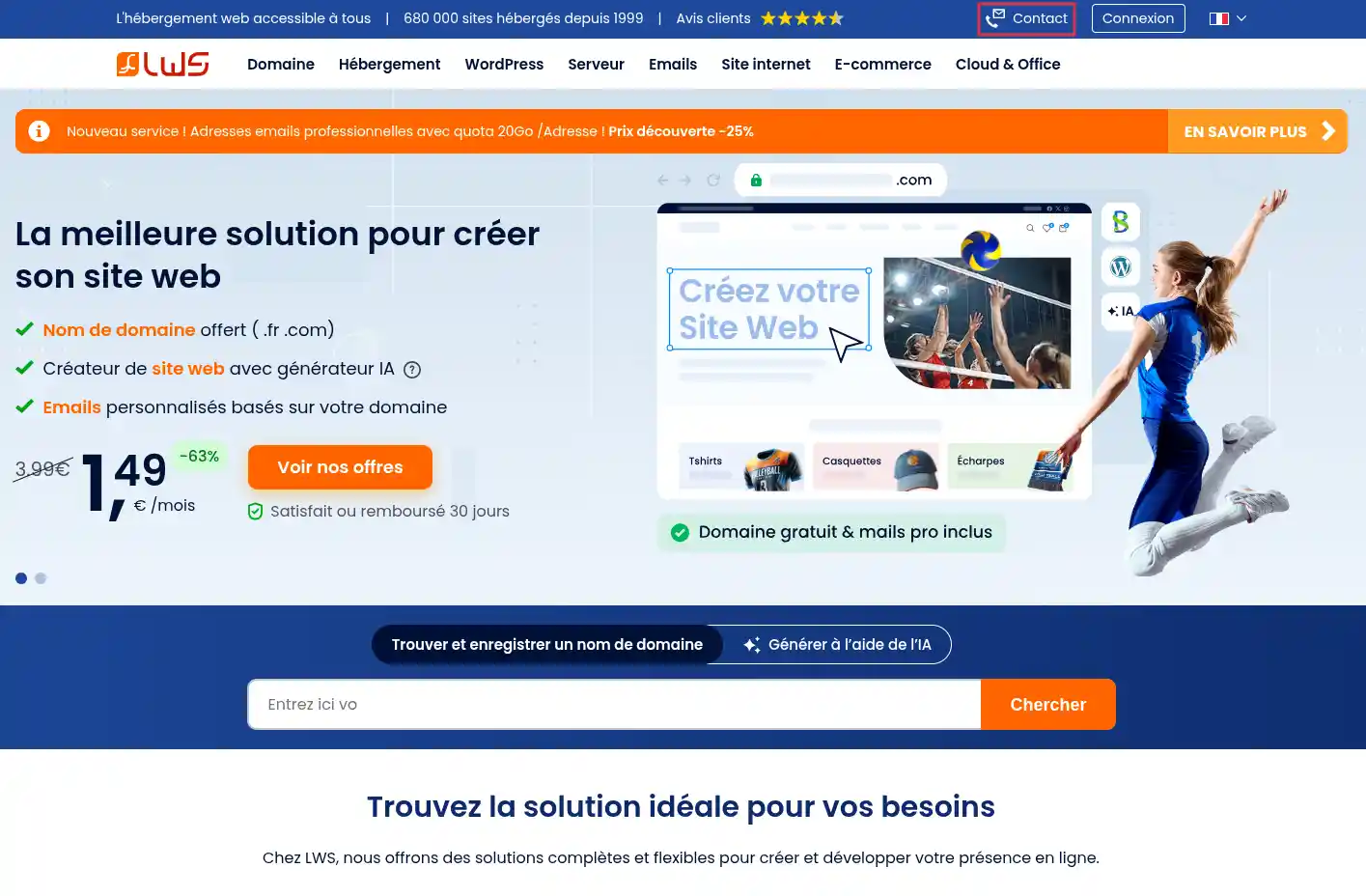
Step 2 : click on the "I am not a customer" button .
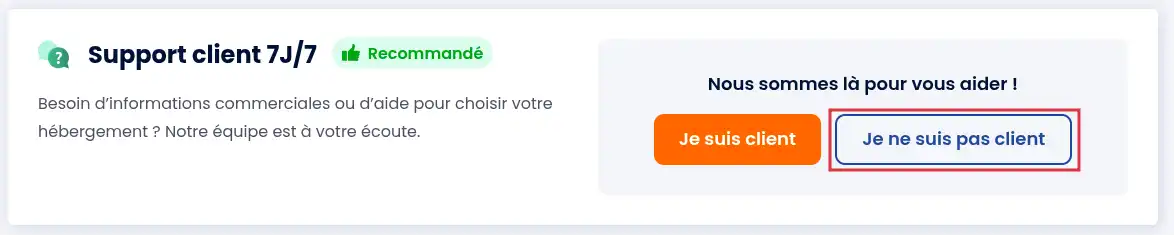
If you are already a customer but are unable to log in to your customer area, you can also use this form to send your request, clearly stating that you no longer have access to your customer account.
Step 3: Complete the requested fields with the information relevant to your request, then click "Send".
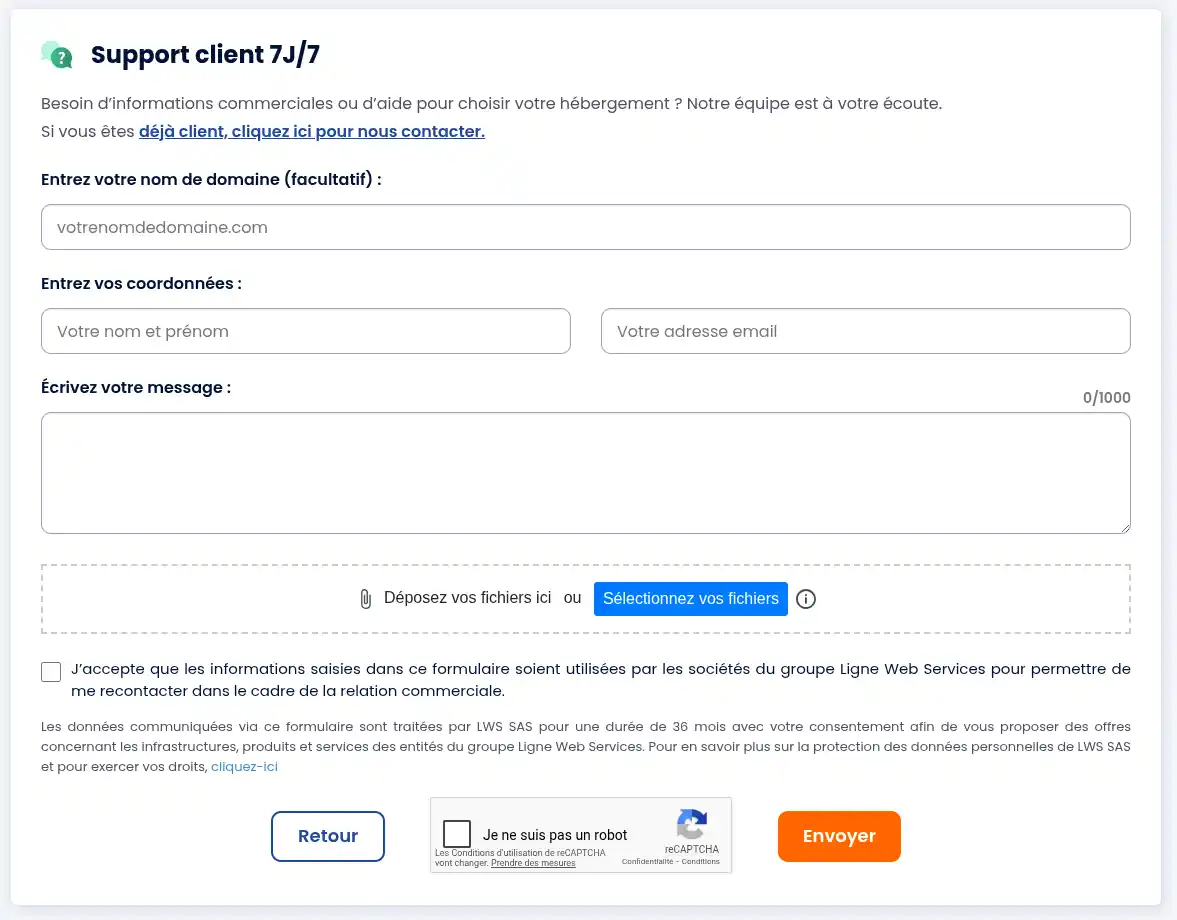
To make it easier to process your request, we recommend that you enter :
For a quicker, more accurate response, remember to include : [bcolor] If you would like to speak directly with an agent, you can contact the LWS sales hotline by telephone. Telephone sales support is available to : Sales support telephone numbers Opening hours The telephone sales service is available Monday to Friday from 9am to 7pm. Information to prepare before calling Prepare the relevant information about your request so that the advisor can answer you more easily. In order to confirm the account concerned, the agent may ask you for several items of information, in particular : It is therefore advisable to have this information ready before the call. When should I call the Hotline? The telephone can be useful if : The role of the agents on our telephone hotline is not to deal directly with your request. Their main role is to analyse your situation and direct your request to the most appropriate service. When you call, the hotline agent will take charge of your request and pass it on to the appropriate department so that it can be dealt with in the best possible conditions. Depending on the nature of your request, it may be directed to : In most cases, your call will result in a ticket being opened with our support team so that your request can be studied and dealt with by the specialist team. If you have the option of opening a ticket directly from your LWS customer area, it is recommended that you use this method rather than contacting the hotline. This generally ensures that your request is dealt with more quickly and efficiently. If the situation requires it, the hotline agent will also be able to provide you with the procedure for making a telephone appointment with an LWS sales advisor to discuss your request in more detail.
Contacting sales support by telephone
If you are not a customer
If you are already a customer
You can ask to be called back by a sales advisor. The callback will take place during the time slot you have chosen, from Monday to Friday.
Step 1 : Go to the LWS telephone appointment booking page.
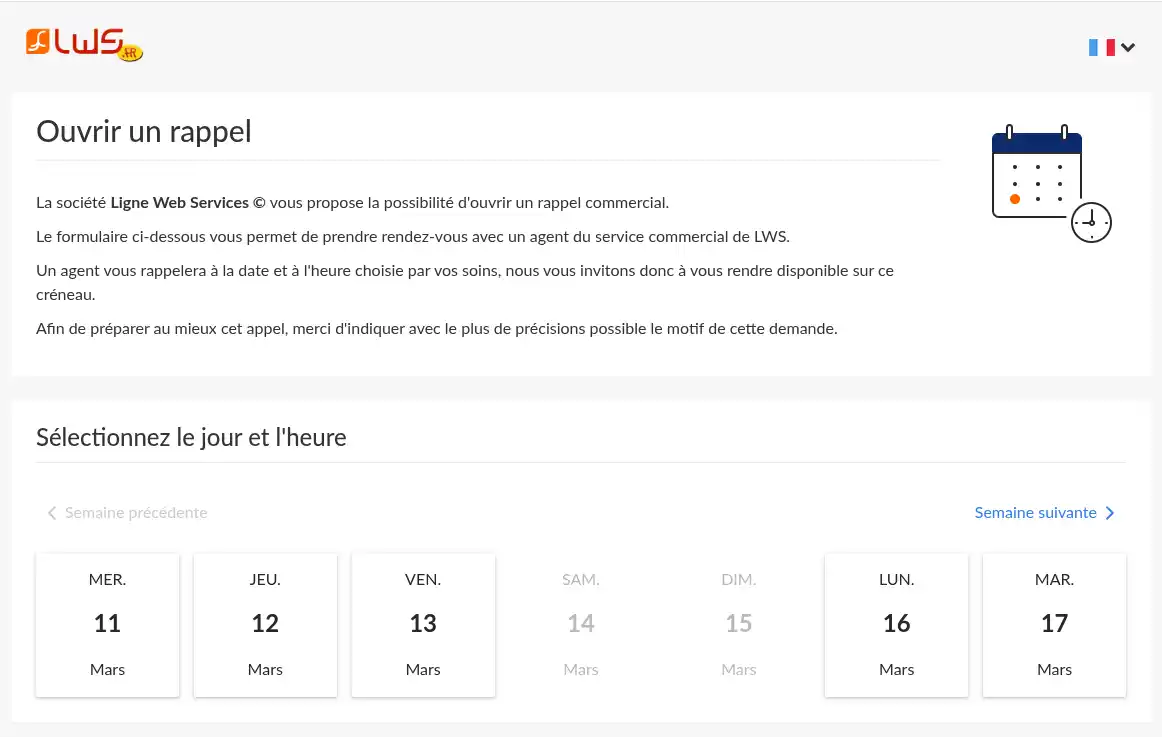
Step 2 : Choose an available date
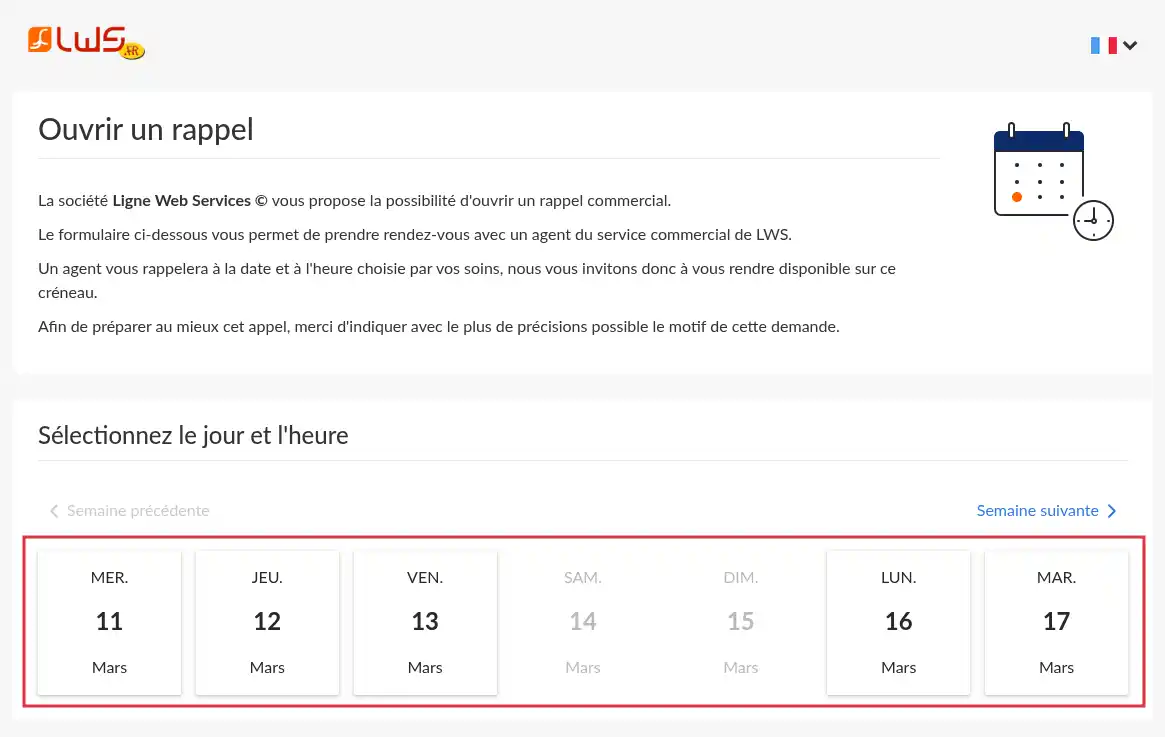
Greyed-out dates indicate dates when the telephone appointment service is not open or dates for which all slots have already been reserved.
Step 3: Choose the time slot when you are available to be called back.
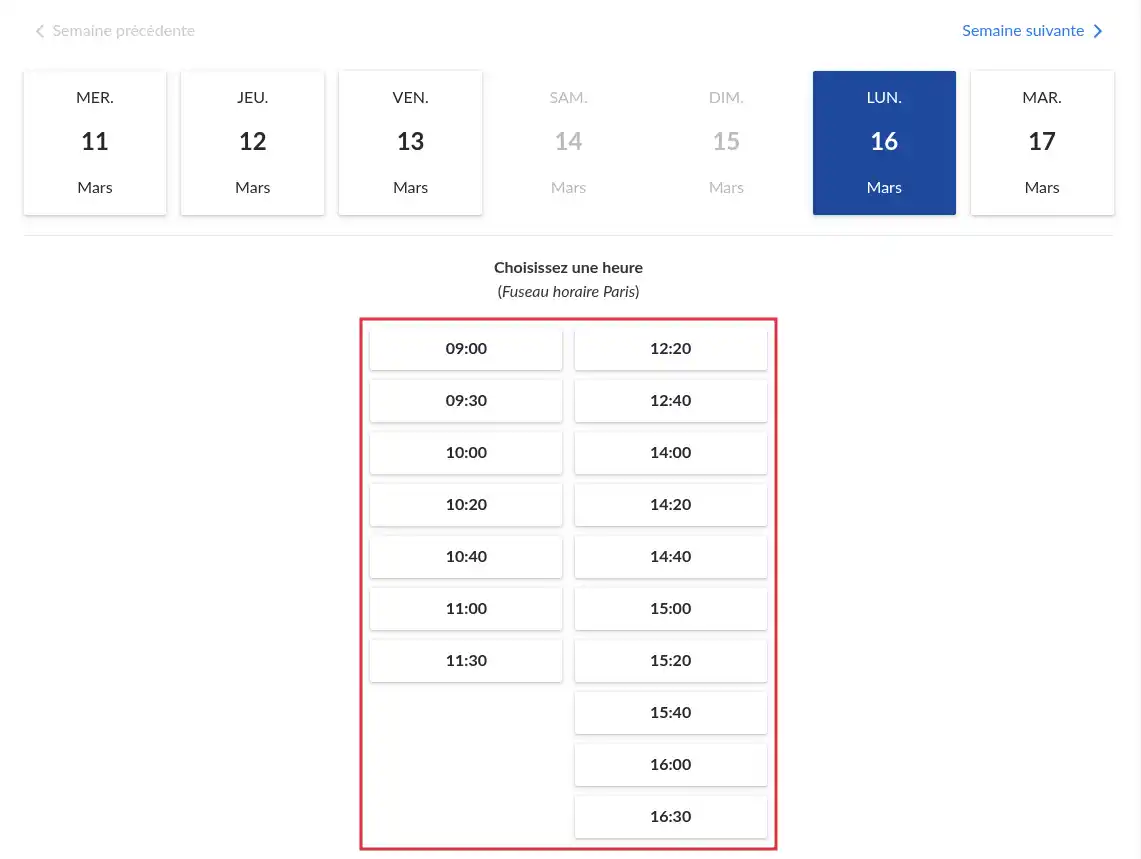
Step 4 : Complete the request form
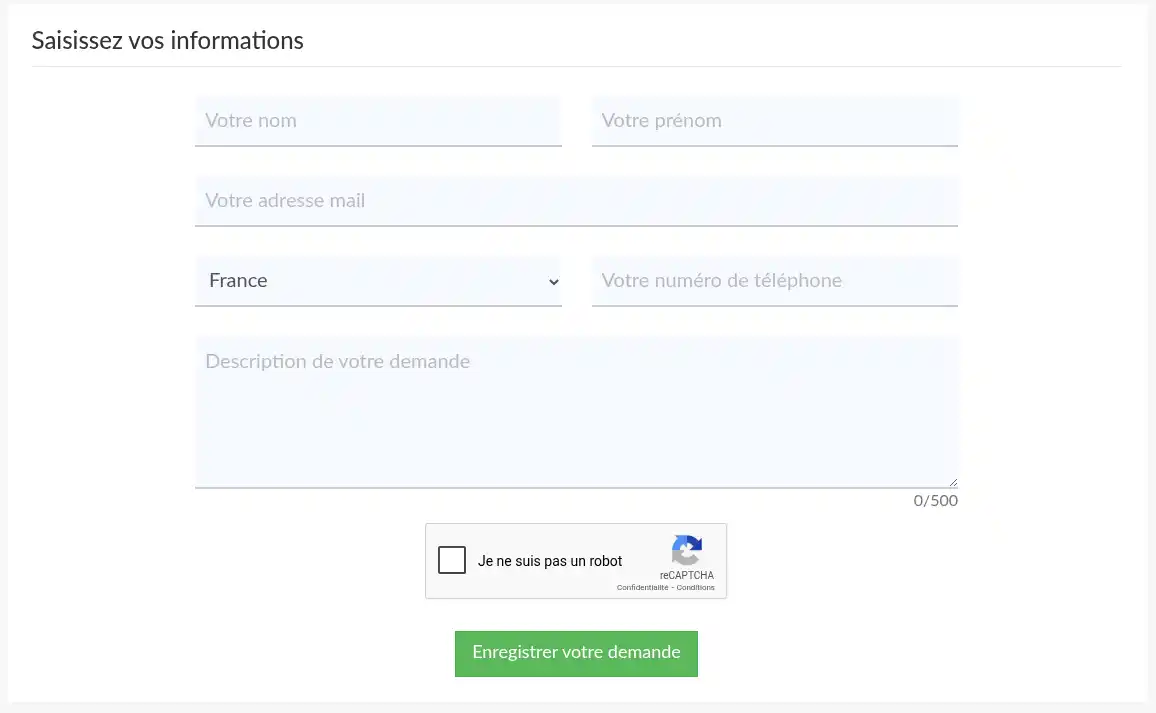
The information requested is as follows
Your first and last name
Your e-mail address
Your country (and telephone number if applicable)
A description of your request
Please be as precise as possible when describing your request, as this will enable the agent to prepare the call as well as possible and provide you with the most relevant answers directly.
Depending on the country selected, an agent will call you by telephone if your country is eligible. If not, a video-conference link will be provided and sent to you by email.
Step 5: Wait for the advisor's call
A sales advisor will call you back during the time slot you have selected, Monday to Friday.
This is useful if you prefer to be contacted at a specific time.
Depending on the means of contact used, there are several ways of checking that your request has been sent.
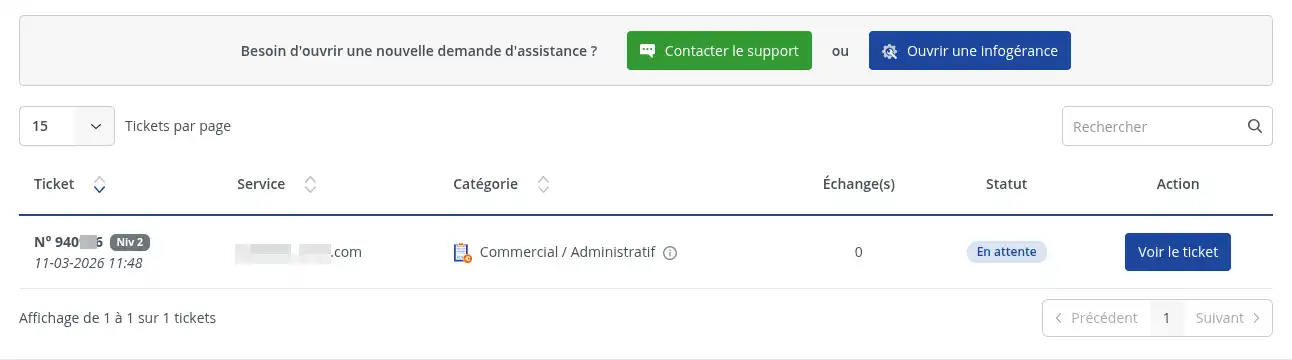
If you used the customer area
After clicking on "Open ticket", your request should be recorded in your customer area. You should be able to find your exchange in the support request tracker.
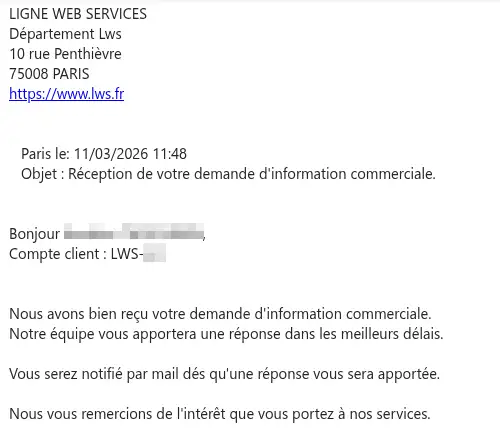
You will also have received a confirmation email on the LWS account contact email address.
If you used the contact form
After clicking on "Send", your request must be sent to sales support.
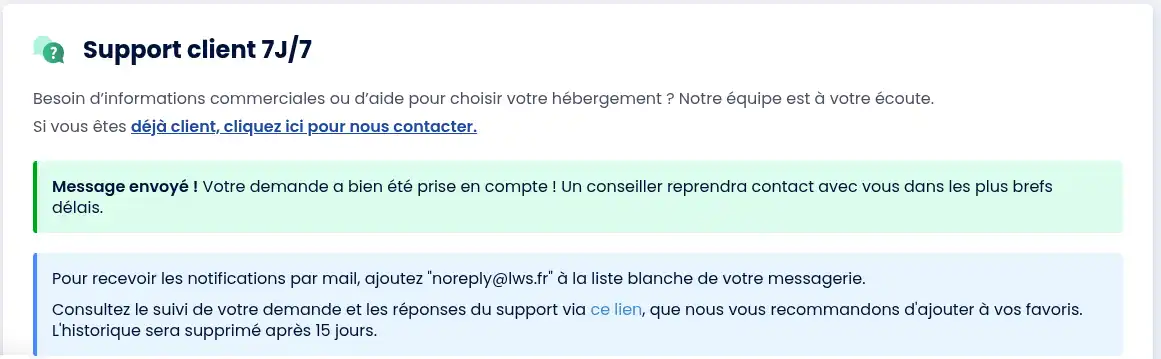
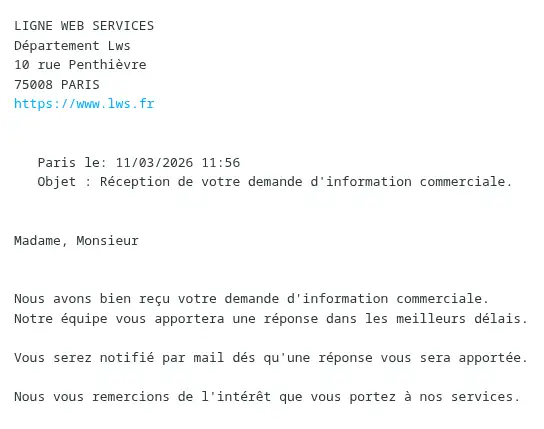
Check that the form has been validated and check the email address given in your request.
If you called by telephone
Your request will be taken into account directly during the conversation with the sales advisor. If the agent opens a ticket for you, you will receive direct confirmation by email. If an appointment procedure is sent by email, check your inbox.
If you have requested a call-back
Your request is taken into account once the form has been validated.
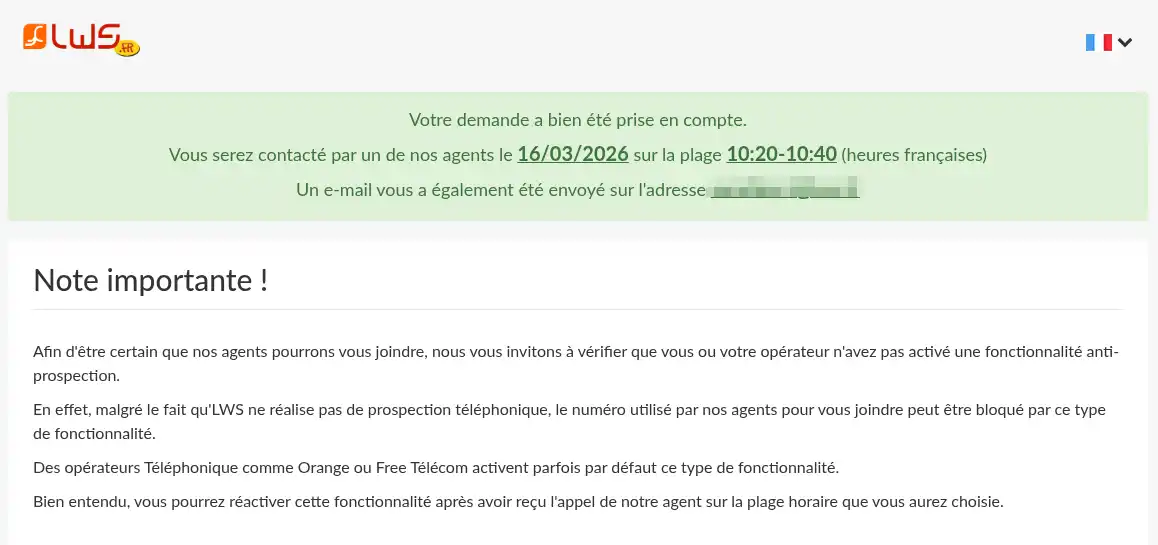
You will also receive a confirmation e-mail allowing you to reschedule your appointment for another time slot or to cancel your appointment if you no longer need it.
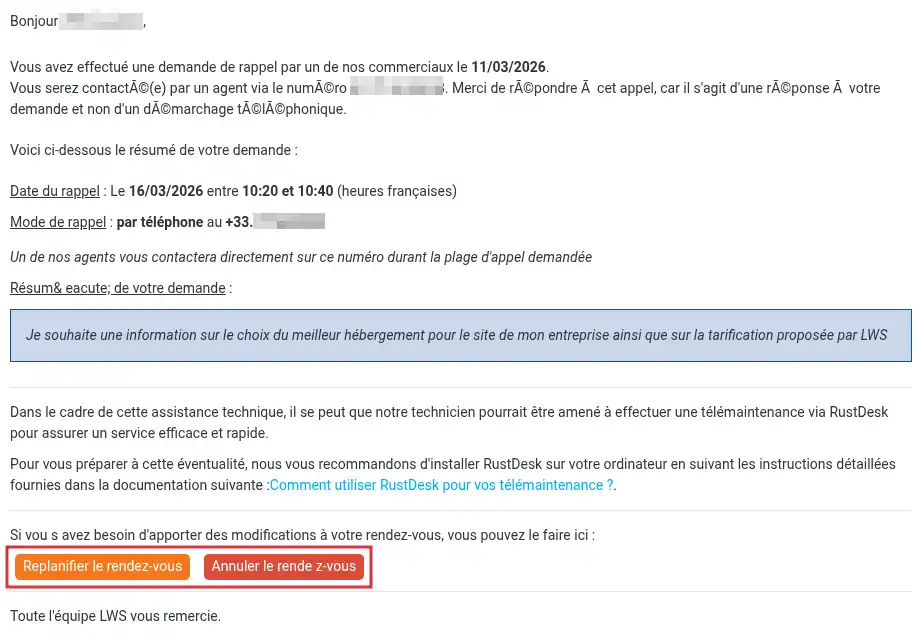
The advisor will then call you back at the time you selected.
Requests relating to the sales contact from the customer area are generally answered within 30 minutes of the request being opened if the customer area is open from Monday to Friday between 8am and 6pm. In the evenings and at weekends, the response time may be longer.
If you have not received a reply after this time:
If your request concerns a quotation, an order, an invoice, an administrative question or a pre-purchase requirement, choose the "Sales/Administrative" category in the customer area.
If your request concerns a technical malfunction, you must go through Technical Support.
Wait for the indicative deadline, then check :
If you don't see a response, contact Sales Support again using the method best suited to your situation.
You now know how to contact LWS Sales Support depending on your situation.
If you are already a customer, the easiest way is to use your LWS customer area.
If you are not yet a customer, you can use the contact form available on the LWS site.
You can also contact a sales advisor by telephone or request a call back at a convenient time.
Rate this article :
1.9/5 | 9 opinion
This article was useful to you ?
Yes
No
Bonjour, merci de votre retour.
Il semblerait vous rencontriez une erreur sur le panel, car l'option de multidomaine est bien disponible sur notre formule LWS Perso.
Nous vous invitons à contacter notre service support à travers votre espace client, afin de vous apporter une aide sur le problème que vous rencontrez. (https://aide.lws.fr/a/268)
Bonjour,
Je vous remercie pour votre messag.
LWS affiche ses tarifs exclusivement en euros, mais nous acceptons les paiements à l’international via carte bancaire (dont VISA) et PayPal. Si votre devise n’est pas l’euro, le règlement devra tout de même être effectué en euros. Votre banque se chargera de convertir automatiquement le montant dans votre devise (ex. : dollars), selon le taux de change en vigueur au moment de la transaction.
Ce taux peut varier selon votre établissement.
Assurez-vous simplement que votre carte bancaire autorise les paiements en ligne et internationaux pour que la transaction puisse aboutir.
Je vous remercie pour votre attention et reste à votre disposition pour toute autre question ou complément d'information.
Cordialement, L'équipe LWS
Bonjour,
Je vous remercie pour votre message.
Je suis désolé de constater que notre automate ne vous ai pas délivré le mail suite à votre commande.
Je ne retrouve pas votre compte client avec l'adresse email indiqué sur cette aide en ligne, je vous invite à solliciter notre support, nous effectuerons les recherches appropriées.
Je vous remercie pour votre attention et reste à votre disposition pour toute autre question ou complément d'information.
Vous pouvez nous contacter depuis votre espace client ou sur cette page : https://www.lws.fr/contact.
Cordialement, L'équipe LWS
Bonjour,
Je vous remercie pour votre message.
Je suis désolé de l'inconfort que vous avez rencontré, en principe nos livraisons se font en 1 heure maximum, dans votre cas je vois que celle-ci a été faites dans les temps, et que tout est actif à présent.
Il est possible que le mail de livraison soit arrivé dans vos spams.
Si je me trompe ou que vous avez un blocage, vous pouvez également contacter notre support technique pour obtenir de l'aide.
Vous pouvez nous contacter depuis votre espace client ou sur cette page : https://www.lws.fr/contact
Merci pour votre confiance.
Cordialement, L'équipe LWS.
Bonjour,
Je pense qu’il y a une confusion.
Nous ne procédons pas à la création d’adresses mail pour les clients de notre côté. Il est donc possible qu’une erreur ait été commise lors de la création de l’adresse depuis votre espace ou par la personne qui l’a configurée.
Je vous invite à vérifier directement dans votre interface de gestion email. Éventuellement, pouvez supprimer l’adresse actuelle et en créer une nouvelle avec le prénom souhaité.
Cordialement, L'équipe LWS
Bonjour,
Pour toute demande concernant ce sujet, je vous invite à contacter directement l’assistance client depuis votre espace client.
Il vous suffit de vous connecter, puis de vous rendre dans la rubrique « Assistance » afin d’ouvrir une demande. Votre requête sera ainsi prise en charge par le service compétent dans les meilleurs délais.
Je vous remercie pour votre compréhension.
Cordialement, L'équipe LWS
 About LWS :
LWS is a 100% French web hosting company that focuses on quality and innovation and offers a responsive and competent technical service at affordable prices.
About LWS :
LWS is a 100% French web hosting company that focuses on quality and innovation and offers a responsive and competent technical service at affordable prices.